
I recently made an exciting purchase: a Roland FP-10 electric piano, a decision that has reignited my passion for music after several years away from playing. During my time in middle school and high school, I enjoyed exploring various musical instruments, but life took me in different directions, and I let that part of myself fade. However, the desire to reconnect with music and improve my skills became overwhelming, prompting me to invest in a high-quality instrument that could support my journey. After setting up my new piano, I eagerly embarked on this musical adventure and dedicated time to researching software to enhance my learning experience. I initially explored Ardour, a powerful open-source digital audio workstation that offers a comprehensive range of features for music production. I was intrigued by its capabilities, hoping it could help me compose and record as I practiced.
Alongside Ardour, I also looked into Apple’s GarageBand, renowned for its user-friendly interface and extensive library of sounds and loops. I appreciated its accessibility, especially for someone looking to ease back into music. Despite these promising options, I found myself searching specifically for software that catered to piano learners. In this quest, I stumbled upon a remarkable program called PianoBooster. This software immediately caught my attention because of its innovative approach to piano education, which combines visual aids with interactive gameplay.
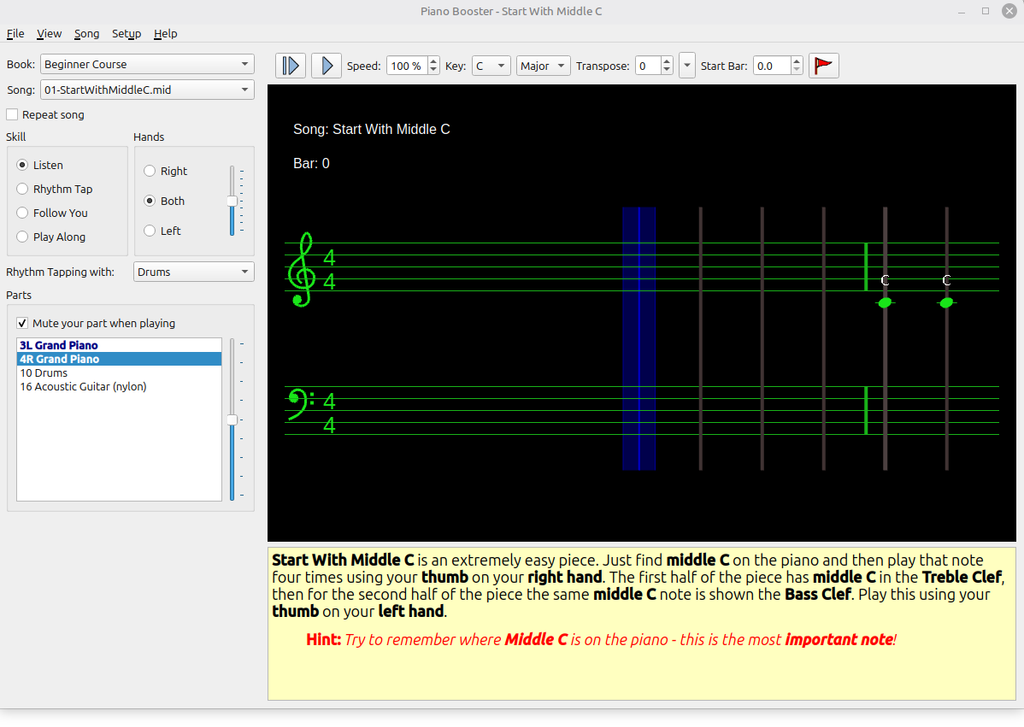
The idea of learning through engaging methods felt refreshing and motivating. PianoBooster seems to offer a structured yet fun way to practice, encouraging users to develop their skills while enjoying the process. I’m genuinely excited to incorporate it into my routine and see how it can complement my practice. As I dive back into the world of music, I look forward to strengthening my abilities and rediscovering the joy of playing the piano.
According to the project website, PianoBooster is a fun way to play along with musical accompaniment while learning the basics of reading musical notation. The difference between playing along with a recording or a standard MIDI file is that PianoBooster listens to and follows your playing on a MIDI piano keyboard.
PianoBooster is software designed for piano instruction, catering to both beginners and advanced musicians. It serves as a valuable tool for teaching music theory and is effective for practicing and honing piano techniques. PianoBooster is free software with a GPL v3 license. Its source code is available for Windows, macOS, and Linux. It was easy to install on Linux Mint, as it is a system package available in the Software Center or as a Linux App Image that can be made executable.
$ chmod +x PianoBooster-1.0.0-x86_64.AppImagePianoBooster is also in the Fedora repositories and can be installed from the command line:
$ sudo dnf install pianoboosterIn conclusion, embarking on this musical journey with my new Roland FP-10 piano has reignited my passion for music and opened new avenues for learning. The combination of high-quality instruments and innovative software like PianoBooster has created an enriching environment for my practice. Its interactive approach not only aids in mastering the fundamentals of piano playing but also makes the learning process enjoyable and engaging.